Showing posts with label monitoring. Show all posts

Friday, May 29, 2020

Create a Read Only EM Account on OEM13c Can Create AWR Report And View Performance Pages

Creating a read only EM account along with viewing databases performance pages and generate AWR and ASH reports looks a piece of cake task, but this took me long time to figure it out, so I thought to write this post about it.

Login to your OEM console: i.e. https://xxx:7803/em
Login as admin account i.e. sysman
Go to Setup -> Security -> Administrators


 -> Click on Create

(Enter the username and password)

-> Next (leave the default roles EM_USER, Public)

-> Next 
Check the following:
   Connect to any viewable target
    Monitor Enterprise Manager
    View any Target


   Go down the page to "Target Privileges" section:
   Click Add to add all databases the user will need to access
A new window will popup, check all the databases the user will need to access then click Select

   Then Check the databases and under the tab "Manage Target Privilege Grants" click the pen

Then Select: [Of course you will need to follow all the pages to check all the privileges you need]
   Connect Target, View Database Actions, View Database ADDM, View Database Advanced Queues, View Database Alert Logs, Manage Database ASH Reports, View Database ASH Reports and Analytics, Manage Database AWR Settings, View Database AWR Reports, View Database Backup, View Database Clients, View Database Links, View Database Dimensions, View Database Directory Objects, View Database Feature Usage, View High Availability Console, View Database indexes, View Database In Memory Setting, View Database Memory Usage, View Database Modules, View Database Materialized Views, View Database Packages and Package Bodies, View Database Performance Home Page, View Database Performance Privilege Group, View Database Optimizer Statistics, View Database Procedures and Functions, View Database Redo Logs, View Database Resources, View Database Roles, View Database Scheduler, View Database Schema Privilege Group, View Database Segments, View Database Sequences, View Database Services, View Database Sessions, View Database SQL Performance Analyzer, View Database SQL Monitor, View Database SQL Plan Control, Use Database SQL Tuning Advisor, View Database SQL Tuning Sets, View Database SQLs, View Database Storage Privilege Group, View Database Synonyms, View Database Table Data, View Database Tables, View Database Tablespaces, View Database Text Indexes, View Database Top Activity, View Database triggers, View Database Types, View Database Users, View Database Workspaces, View XML Database

  Click Continue
  This will allow the user to have a Read Only privilege on the selected DB along with generating AWR & ASH reports.


-> Next
-> Next
-> Finish

In case you need to create a similar EM user with similar privileges like the one you already created, you don't have to go through this daunting task again, just go to Setup -> Security -> Administrators


Check the user you want to create like and Click on "Create Like" button

-> Enter Name & Password


-> Click Review at the most right side of the page
 

-> Finish
That one was easy!

Monday, March 11, 2019

DBA Bundle V5.1

The latest version of DBA Bundle is now available:
https://www.dropbox.com/s/k96rl0f4g39ukih/DBA_BUNDLE5.tar?dl=0

Many awesome features added to the bundle including but not limited to:
  • Database monitoring script [dbalarm] can now send most of the alerts in HTML format.
  • Database Health Check script [dbdailychk] can now send the report in HTML format.
  • Added more options to the audit script zAngA_zAngA.sh to make the displayed data more focused.
  • Fixed minor bugs in many scripts along with enhancing the capability of the rest of scripts to work smoothly on different environments.

If you are new to the DBA BUNDLE please follow this link to read more about its features and how to use it:

Sunday, March 10, 2019

Database Health Check Script Is Now HTMLized

The HTMLization campaign continues on the DBA Bundle scripts as I received enormous requests asking to make the scripts send the email alerts/reports in HTML format, I understand that HTML format E-mails are more friendly to read especially from mobile phones.

The script will now automatically check if your machine has the required package "sendmail package" to send HTML E-mails  or not, if it already exists then it will format the content in HTML format and send you an HTML formatted E-mail, if the sendmail package is not there, it will revert back to the old fashion text email without having you miss any alert/report.

You can control the "enable/disable" of the automatic behavior of sending HTML emails by setting the following parameter under THRESHOLD section to whether ON or OFF :

# #########################
# THRESHOLDS:
# #########################
# Send an E-mail for each THRESHOLD if been reached:
# ADJUST the following THRESHOLD VALUES as per your requirements:

HTMLENABLE=Y            # Enable HTML Email Format                                      [DB]

....

The HTML received report will look like this: [Excerpt]


To download the script:
https://www.dropbox.com/s/w1dpw3iynphm07t/dbdailychk.sh?dl=0

To Read the complete description and how to use the script:
http://dba-tips.blogspot.com/2015/05/oracle-database-health-check-script.html

Sunday, February 24, 2019

Database Monitoring Script Is Now HTMLized

Now dbalarm script for database and server monitoring has its vast majority E-mail alerts in HTML format. This will give the E-mail alerts a friendly look when you check them from your mobile.

For instance, instead of receiving a locked session E-mail alert in TEXT format like this:


You will receive the E-mail alert in HTML format like below:


The script will automatically check if "sendmail" package that sends the emails in HTML format is installed or not on your server, if installed you will receive the email alerts in HTML format, otherwise it will automatically revert to the text format version. you may think it's a small feature, but this feature alone cost me days of coding to make it work :-)

To download the script follow this link:
https://www.dropbox.com/s/a8p5q454dw01u53/dbalarm.sh?dl=0

If you are not yet familiar with dbalarm script and want to understand how to use it and what it does, please follow this link:
http://dba-tips.blogspot.com/2014/02/database-monitoring-script-for-ora-and.html

If you have any concern, suggestion or something didn't work for you please let me know.

Monday, February 18, 2019

New Database Administration Bundle | DBA_BUNDLE 5.0

DBA_BUNDLE5 is now available for download:
https://www.dropbox.com/s/k96rl0f4g39ukih/DBA_BUNDLE5.tar?dl=0

It comes with the Following new features:
  • Database monitoring script [dbalarm] can perform the following additional tasks:
    • Monitor ASM instance Alert log and report the errors.
    • Monitor Grid Infrastructure Alert log and report errors and the following events:
      • Shutdown/Startup events.
      • Node eviction events.
      • Network IP conflict.
      • Heart Beat failures.
      • service failure events. 
    • Monitor Golden Gate log [If installed] for Errors and Process ABENDED events.
    •  Monitor dmesg log [Device Driver messages] for errors.
  • The bundle main "environment setup" script [aliases_DBA_BUNDLE] can locate and create aliases for:
    • ASM instance alert log. [asmalert alias]
    • Grid Infrastructure/Clusterware alert log. [raclog alias]
    • GRID_BASE and GRID_HOME locations.
  • Fixed minor bugs in many scripts along with enhancing the capability of the rest of scripts to work smoothly on different environments.
To learn more about DBA BUNDLE and its features, please follow this link:
http://dba-tips.blogspot.com/2014/02/oracle-database-administration-scripts.html


Sunday, January 27, 2019

360 Degree Database Server Monitoring Script For Oracle

Do you have a Linux server with a critical Oracle database running on it?
Are you tired of searching google for a free script that can fully monitor that server in one go?

If your answer is Yes, then this article was written for you. Bring yourself a cup of tea and read this article to the end.

The script I shared many years back to only monitor ORA errors in the DB alert log, and now it's capable to completely monitor an Oracle Database server in a 360-degree fashion.

Here is a list of all components the script can monitor:

- Database Monitoring:
  - Monitor all DATABASES ALERT LOG for ORA and TNS errors.
  - Monitor all LISTENERS' ALERT LOG for ORA and TNS errors.
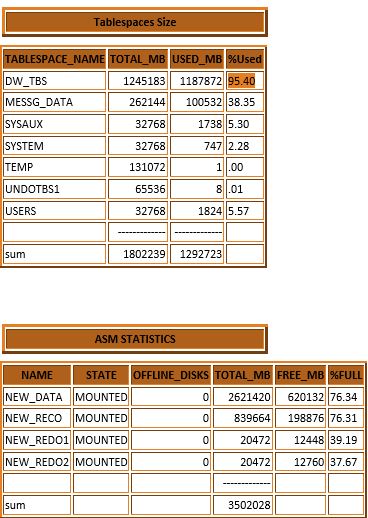
  - Monitor TABLESPACES utilization.
  - Monitor FLASH RECOVERY AREA (FRA) utilization.
  - Monitor ASM Disk Groups utilization.
  - Monitor BLOCKING LOCKS.
  - Monitor database named SERVICES.
  - Monitor RMAN Backup Failure.
  - Monitor the database if it goes OFFLINE or gets HANGED.
  - Monitor if NO listeners are running on the server.

- Grid Infrastructure Monitoring:
  - Monitor the ASM alert log for ORA and TNS errors.
  - Monitor the Grid Infrastructure alert log for ORA and TNS errors.
  - Monitor the Grid Infrastructure alert log for Shutdown/Startup events.
  - Monitor the Grid Infrastructure alert log for Node eviction events.
  - Monitor the Grid Infrastructure alert log for Network IP conflict.
  - Monitor the Grid Infrastructure alert log for Heart Beat failures.
  - Monitor the Grid Infrastructure alert log for service failure events.

- OS/Hardware Errors:
  - Monitor the CPU for high utilization.
  - Monitor the Filesystems / Mount Points space utilization.
  - Monitor dmesg log for new entries which let you know what is going on on OS.

- Golden Gate Monitoring:
  - Monitor the Golden Gate log for Errors and Process ABENDED events.

How to use the script:

- Download the script from here:
https://www.dropbox.com/s/a8p5q454dw01u53/dbalarm.sh?dl=0

- At line# 60 Replace "youremail@yourcompany.com" with YOUR E-mail address.

- Each part/feature in this script can be easily adjusted by editing the values under the THRESHOLD section, read the comment carefully for each control before altering it.

For a complete guide on how to use the script, I recommend you to read the main article:
http://dba-tips.blogspot.com/2014/02/database-monitoring-script-for-ora-and.html

Saturday, April 21, 2018

Shell Script To Monitor Long Running Queries In Oracle

Monitoring long-running queries is part of the early warning mechanism for the performance
issues on the database before it gets exaggerated


If you're running Oracle on Linux, then this script is for you.
Download link:
https://www.dropbox.com/s/yh6k3r7q3p876h0/report_long_runing_queries.sh?dl=0

The script is easy to use, it will run against all instances on the server reporting any active sessions/query for more than 60 minutes (the default), you can adjust this duration by changing the following parameter under THRESHOLDS section to whatever number of minutes you want:

EXEC_TIME_IN_MINUTES=60        # Report Sessions running longer than N minutes (default is 60 min).

Also, you can control the report generation if the number of long active sessions have reached a specific count. By adjusting the following parameter:

LONG_RUN_SESS_COUNT=0        # The count of long-running sessions, report will not appear unless reached (0 report all long running sessions).

Lastly, you must provide your email address in order to receive a detailed Email report of long-running queries/active sessions, by editing below template in navy color:

MAIL_LIST="youremail@yourcompany.com"

You can schedule the script in the crontab to run every 5/10 minutes.

In the upcoming post, I'll share another script to automatically kill long active sessions connected by specific programs like SQL Developer or Toad. Let's make the life of our beloved developers easy as they always make our life easy :-)

Monitor Long Running Queries | Long Active Sessions Script (GitHub version):